
All in One View
Content from Introduction
Last updated on 2026-09-21 | Edit this page
Overview
Questions
- Why signature development?
- What is PRONOM?
Objectives
- Understand why we care about signatures
- Gain an overview of PRONOM and its benefits.
Know what you’ve got (Why are we interested in identifying file formats?)
If you don’t know what you have then how are you supposed to take care of it!
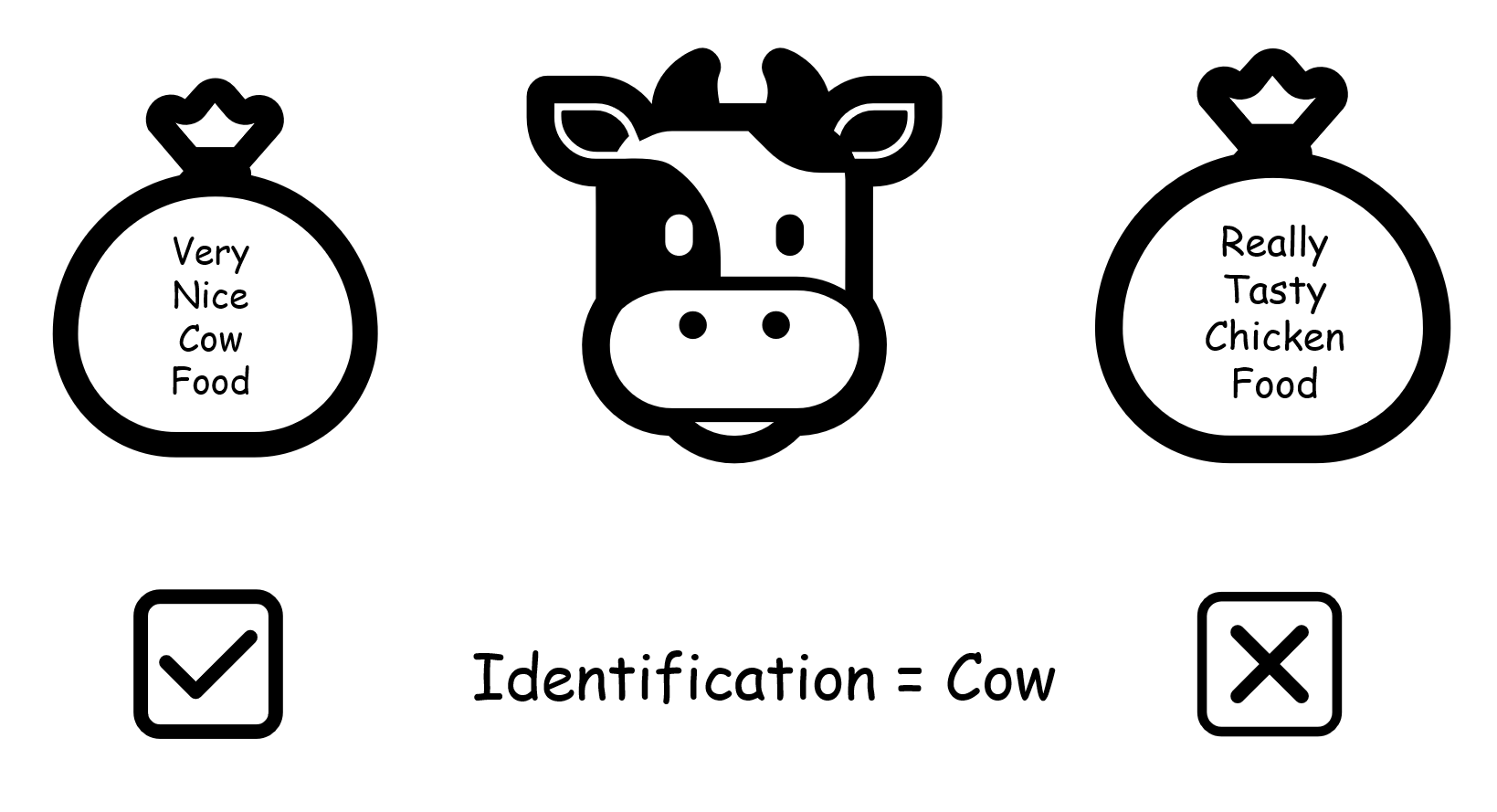
This applies to most caretaking roles, imagine you own a farm and you tried to feed the cows chicken food. You would not have a very successful farm.
File formats, software and storage technologies develop at a frighteningly fast rate.
Computers have changed beyond recognition in a single working lifetime.
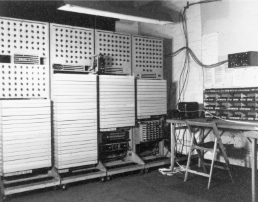 From a machine that covered an entire room… |
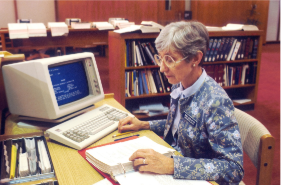 To one that fits on your desk in less than forty years |
| HW 225/26, Colossus computer WWII. Copyright The National Archives | A librarian at The National Library of Medicine using an IBM computer to access PDQ, 1987. Photo by National Cancer Institute on Unsplash |
- Knowing what you’ve got is a basic first step for managing digital information - whether that’s records management, managing digital continuity or Digital Preservation
- Our aim is to keep our digital information useful and usable.
- For ‘useful’ we usually think about managing the provenance and context of digital information - where it came from, what it’s for, what it means…. This work is often done by records managers or cataloguers.
- To keep digital information usable, we need to understand its technical characteristics. Identifying file formats with confidence is a first step in planning to keep those records usable - ensuring access to tools or services that make the records possible to open, render or search in the future. This is at the heart of digital preservation.
- This is detailed work. The precise format (e.g. what version of Word or PDF do we have?) can be important.
How can we identify file formats?
- There’s not one single method, but often there are a few clues
The tools used to make it
- You may simply know what tools or software were used to create your digital records (e.g. you know what camera was used by a project or what word processor was available at the time). But usually we don’t know this with any confidence, particularly if the records were created a long time ago or came from outside the organisation.
File extensions
- File extensions can be very helpful. But they can be changed and they don’t usually tell us about specific versions.
Looking inside the files
- To be more certain of a correct identification we need to look inside the digital files, at the precise sequence of codes within the file. Sometimes the file format is stated within the file itself or will be part of a set of patterns point us towards an identification. These patterns are known as file format signatures. The starts and ends of files are good places to look for these patterns.
Analysing Files
- The encoding inside file formats can point us towards how they can be identified, by looking for reoccuring sequences or characteristic patterns. More often we will be looking for characteristic patterns that
- Some file formats have a formal specification - like a set of rules detailing how these files should be constructed. Only files that conform to the specification are ‘valid’ examples of that file format. If we have access to the specification, it can help us with signature development. The specification will define patterns that we can look for. But reality is more complicated than this: the software products used to create the files may not implement the specification correctly. We may see examples of files that seem to work just fine (i.e. they can be opened, viewed, edited using the relevant software) but if our identification relies on just the rules in the specification, we won’t get a match. It can help us to know whether or not a file is a valid example of the format - because invalid files may be at greater risk of being unusable in the future, if a new generation of the software is stricter.
- So, when creating signatures, we should review the specification if it’s available. But we usually want to look beyond the specification. Ideally, we should also look at examples of real files, from different sources if possible.
- Because of this variation, file format research is both an art and a science. Looking for patterns in files is a fairly structured activity. Making a judgment about how strict to be or when to be flexible is more of an art. If we make the signature too strict, we’ll fail to identify some real examples. If we make it too flexible, we’ll generate false identifications.
PRONOM
PRONOM is a file format registry, a database of file format information. It has over 2000 different entries (that’s over 2000 different file formats). Each entry includes identification charactersitics of the format which can include these internal characteristics and patterns found within the files.
- These file format signatures are useful to all of us. PRONOM is used within many file format identification tools such as DROID and Seigfried.
- PRONOM is used by people and also by software tools to help us identify the file formats in our digital collections.
A Short History of PRONOM
PRONOM is maintained and hosted by The National Archives, UK but is the result of over 20 years of research and contribution from 100s of individuals and institutions across the world. It is a free shared resource, created by the digital preservation community for the digital preservation community.
[insert picture of global map]
Be Aware
- PRONOM is created by humans, and humans can make mistakes.
- PRONOM is not comprehensive, far from it. Although the most common file formats are covered, at some point in your digital preservation work you will encounter a file format that doesn’t have a signature in PRONOM. Or you may find that a signature exists, but it doesn’t work well for the files in your collection.
Today
We will be embarking on researching and creating a new signature and then adding it to PRONOM!
By the end of this workshop, you should be able to:
- Investigate a file format and find patterns
- Express patterns in PRONOM syntax
- Create a signature file
- Use your signature file locally
- Contribute signatures to PRONOM
It isn’t just the beginning of your PRONOM journey, it’s the
beginning of your digital forensics journey!
Enjoy!
Content from Talking with Computers
Last updated on 2026-09-21 | Edit this page
Overview
Questions
- How do computers store information?
- Where does text come from, if computers only store numbers?
- What are encodings?
Objectives
- Learn how computers store data, and how that data becomes something you can read on your screen.
- See that binary, hexadecimal and text are three ways of writing the same thing.
How do we analyse file formats
To analyse a file we look at the hexadecimal of the file, there are a few reasons for this: * It is easier to read than binary * It doesn’t vary in the way different encoding can
But what is binary, what is hexadecimal and what are encodings?
Let’s start at the beginning
Computers are built from billions of tiny electronic switches called transistors.
Like a light switch, each transistor has two possible states:
- On
- Off
To make these states easier to work with, we represent them
as:
- On = 1
- Off = 0
These 1s and 0s are called binary digits, or bits. A single bit can only store one of two values: 0 or 1
These are usually what you can see when a spy is breaking into a computer in an action movie
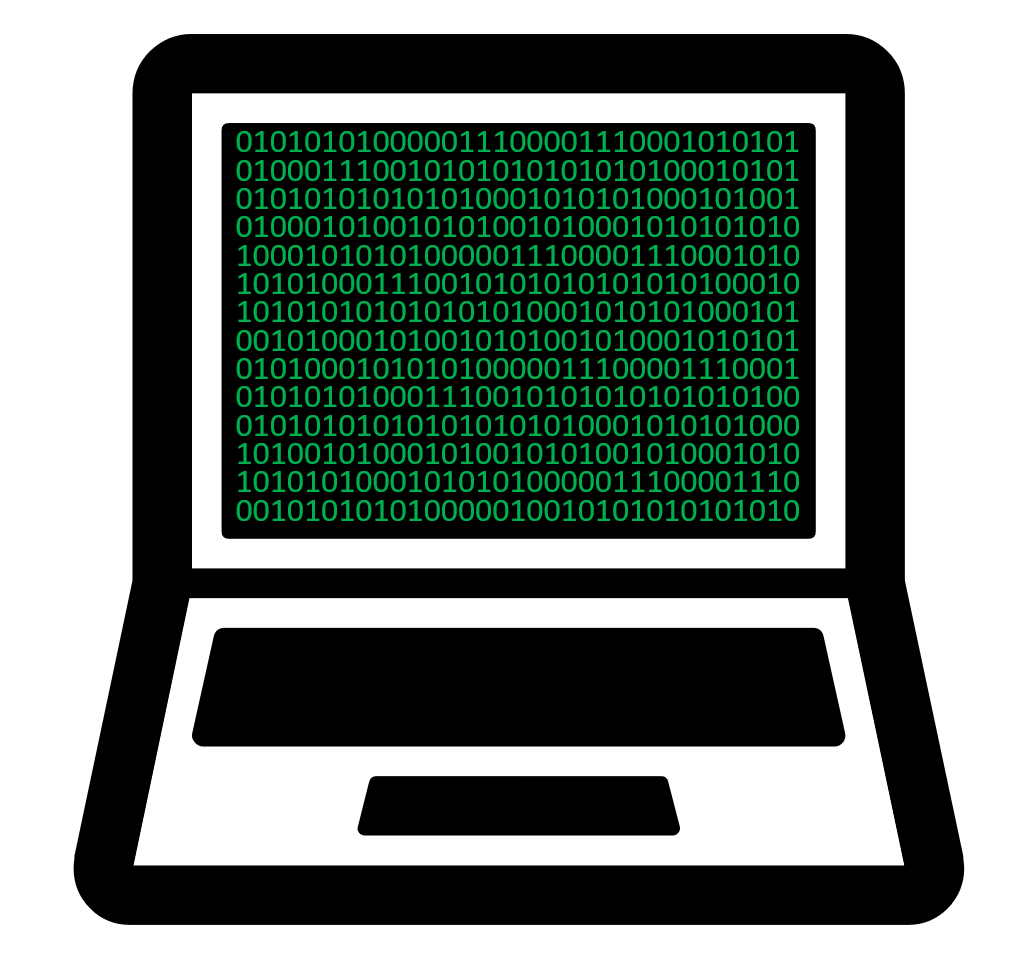
What is behind your computer data?
- Computers combine the bits together, representing letters, numbers, images, sound, video, software and the information you see on a screen
- We call 8 of these bits grouped together a byte: 01001001
- This is the data that computers are interpreting
- Based on the order of the 0s and 1s in a byte they represent a single number
- There are 256 variations of 0s and 1s that can be stored in a byte
- 0 (b00000000) is the smallest number you can represent in binary in a single byte,
- 255 (b11111111) is the largest possible value.
 |
 |
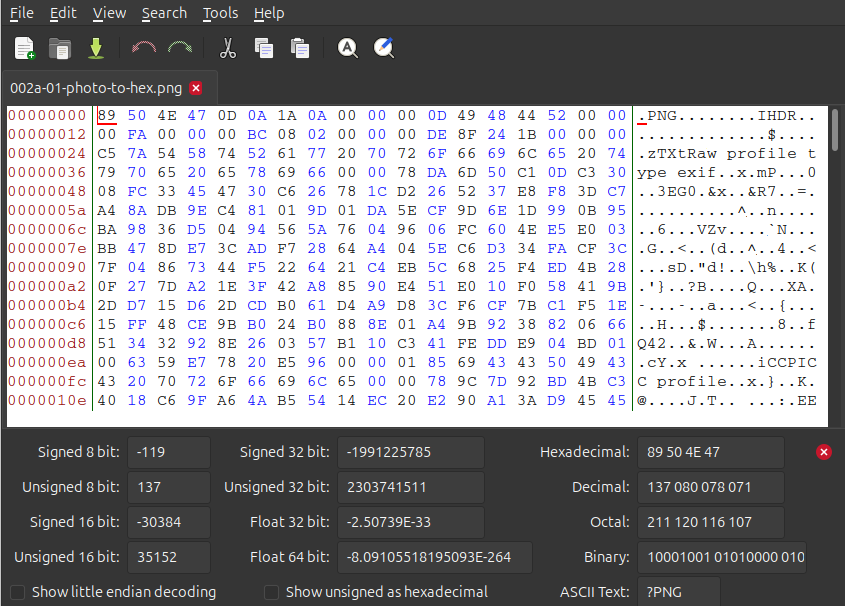 |
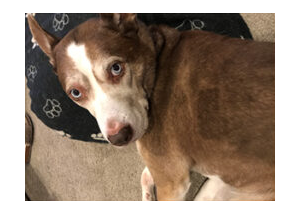
The dog and the hex are the same file. One of them is what your software renders for you. The other is what is actually sitting on the disk. Everything we do from here happens on the right hand side.
Solving the communication barrier
- Computers combine the bits together, representing letters, numbers, images, sound, video, software and the information you see on a screen.
- Computers ultimately store everything as binary
- Binary is difficult to read, so we convert the bytes into a numeric system called hexadecimal. We choose hexadecimal because there are more options than the decimal counting system we are used to.
Why hexadecimal?
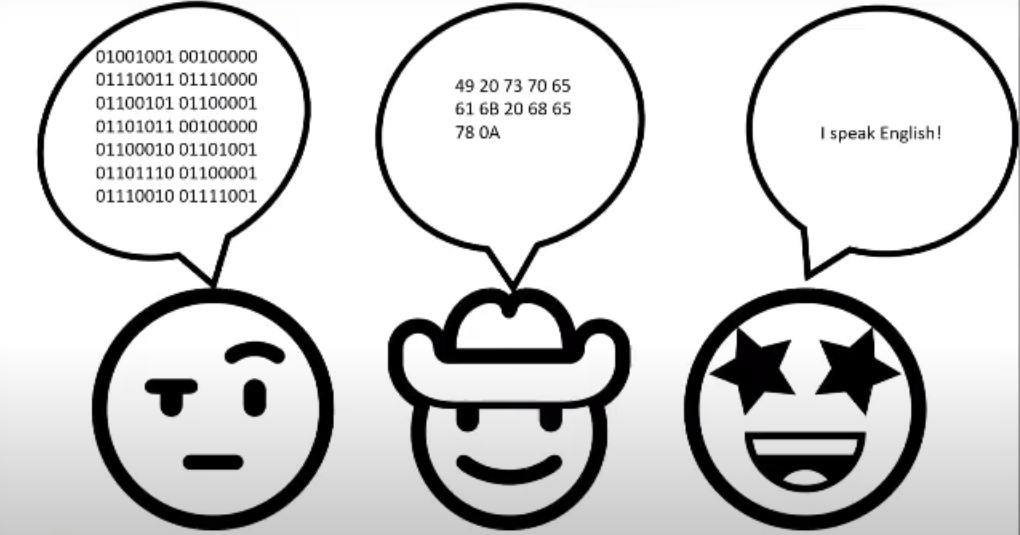
Although computers use binary, humans find long strings of 1s and 0s difficult to read. For example:01001001 is not particularly memorable. Hexadecimal provides a shorter way of representing the same data. The binary value: 01001001 can also be written as: 49
Encodings
So if a byte is only ever a number, where does the letter
I live? It doesn’t. Nothing in a byte is a letter. To store
text on a computer we use an encoding, and an encoding acts as a
translation table between characters and numbers. We agreed that 73
means I, and everything that reads the file agrees too.
| Character | Decimal | Hexadecimal | Binary |
|---|---|---|---|
I |
73 | 49 |
01001001 |
All four columns are saying the same thing.
The table we’re using here is ASCII. It covers the English alphabet, the digits, some punctuation and a handful of control codes, and that is all it covers. In the olden days software developers only thought about English, so that was fine. It was not fine for most of the planet.
Where do you get ‘ā’, or ‘世’?
Today we have Unicode, and encodings like UTF-8 that store those characters using more than one byte each. We’ll see what that looks like in the next episode.
Do you have a favourite letter/ number/ symbol/ emoji? Try looking up your favourite in hex or binary.
When the agreement breaks down
There are many different encodings. A file written with one encoding
and read back with a different one is not broken. Its bytes are fine.
They are just being looked up in the wrong table.
That is where
’ and ä come from, and why a name with a
macron in it can arrive in your catalogue looking like nonsense.
Example Māori macrons in UTF-8
0xC4 0x81 = ā
0xC4 0x93 = ē
0xC4 0xAB = ī
0xC5 0x8D = ō
0xC5 0xAB = ū
0xC4 0x80 = Ā
0xC4 0x92 = Ē
0xC4 0xAA = Ī
0xC5 0x8C = Ō
0xC5 0xAA = Ū
Hello World in Japanese in UTF-8
0xE3 0x81 0x93 = こ
0xE3 0x82 0x93 = ん
0xE3 0x81 0xAB = に
0xE3 0x81 0xA1 = ち
0xE3 0x81 0xAF = は
0xE4 0xB8 0x96 = 世
0xE7 0x95 0x8C = 界
- Computers store everything as bits: switches that are either on or off.
- 8 bits make a byte, and a byte holds one of 256 values.
- Binary, hexadecimal and encodings such as UTF-8 or ASCII are three ways of writing the same thing.
- Hexadecimal is the one we work with in file format analysis.
Content from Hexadecimal
Last updated on 2026-09-21 | Edit this page
Overview
Questions
- What is hexadecimal?
- What are the basics of hexadecimal?
- Why is hexadecimal important to look at files?
Objectives
- Learn what hexadecimal is.
- Learn how to construct a hexadecimal sequence with arbitrary meaning.
Introduction to hexadecimal
- Hexadecimal is a way of representing numbers.
- Hexadecimal uses 16 symbols (0-9 and A-F) compared to the 10 symbols (0-9) familiar in the decimal number system.
- Just as decimal is otherwerise known as Base10, hexadecimal is just Base16.
| DEC | 0 | 1 | 2 | 3 | 4 | 5 | 6 | 7 | 8 | 9 | 10 | 11 | 12 | 13 | 14 | 15 |
| HEX | 0 | 1 | 2 | 3 | 4 | 5 | 6 | 7 | 8 | 9 | A | B | C | D | E | F |
| DEC | 16 | 17 | 18 | 19 | 20 | 21 | 22 | 23 | 24 | 25 | 26 | 27 | 28 | 29 | 30 | 31 |
| HEX | 10 | 11 | 12 | 13 | 14 | 15 | 16 | 17 | 18 | 19 | 1A | 1B | 1C | 1D | 1E | 1F |
- While you can learn to convert decimal to hexadecimal, you are more likely to convert hexadecimal to decimal when looking at file formats.
0x00 = (16 x 0 = 0) + (1 x 0 = 1) = 0
0x01 = (16 x 0 = 0) + (1 x 1 = 1) = 1
0x0A = (16 x 0 = 0) + (1 x 10 = 10) = 10
0xFF = (16 x 15 = 240) + (1 x 15 = 15) = 255Try it in your search engine
If you use a search engine, what results do you get for the following queries?
0xFF in decimal42 in hexadecimal82 in binary0b1100 in decimal
Search engines can conveniently do the work of converting from decimal to hexadecimal and back for you. You can also investigate binary numbers quickly and easily this way without having to work out the layout of bits.
Zero to hero!
Zero is an important number in computer science and we will see it often when we analyse digital records.
What does 0x mean?
We use the 0x prefix to signify hexadecimal. When we
document hex sequences like above 0xE4 0xB8 0x96 is also
equivalent to 0xE4B896. How you choose write this
information depends on context.
You also saw 0b as a prefix. This is used to denote
binary (Base2),
e.g. 0b1100 equals 0x0C equals
12.
- A pair of hexadecimal numbers is a convenient representation of 1-byte, i.e. 8 bits of binary which is the smallest and most convenient unit of data used in computer memory.
Binary
- Binary uses 2 symbols, 0 and 1.
- Binary can otherwise be referred to as Base2. We won’t explore binary in detail here, but if you ever want to look at the binary representation of a number, modern search engines can do the conversion for you if you ask: 255 in binary (just as you can ask: 255 in hexadecimal.
ASCII lookup table
That might feel like a lot, but before we have to convert numbers every which way, we have another tool at our disposal, a lookup table which is still relevant in our research.
In the lookup table below (the ASCII table) you can see how bytes take on more meaning to a computer, e.g. as control symbols, punctuation symbols, numbers, and letters.
For the numbers and letters, this is just one encoding. We will talk about the importance of that below but first let’s look at the table for a second.
question
When you look at the table, think about your favorite (decimal) number.
- What symbol does it represent?
- What’s your favourite (hexadecimal) number, what symbol does it represent?
ASCII table
| Dec | Hex | Char | Dec | Hex | Char | Dec | Hex | Char | Dec | Hex | Char | Dec | Hex | Char |
|---|---|---|---|---|---|---|---|---|---|---|---|---|---|---|
| 0 | 0 | NUL | 25 | 19 | EM | 51 | 33 | 3 | 77 | 4D | M | 103 | 67 | g |
| 1 | 1 | SOH | 26 | 1A | SUB | 52 | 34 | 4 | 78 | 4E | N | 104 | 68 | h |
| 2 | 2 | STX | 27 | 1B | ESC | 53 | 35 | 5 | 79 | 4F | O | 105 | 69 | i |
| 3 | 3 | ETX | 28 | 1C | FS | 54 | 36 | 6 | 80 | 50 | P | 106 | 6A | j |
| 4 | 4 | EOT | 29 | 1D | GS | 55 | 37 | 7 | 81 | 51 | Q | 107 | 6B | k |
| 5 | 5 | ENQ | 30 | 1E | RS | 56 | 38 | 8 | 82 | 52 | R | 108 | 6C | l |
| 6 | 6 | ACK | 31 | 1F | US | 57 | 39 | 9 | 83 | 53 | S | 109 | 6D | m |
| 7 | 7 | BEL | 32 | 20 | space | 58 | 3A | : | 84 | 54 | T | 110 | 6E | n |
| 8 | 8 | BS | 33 | 21 | ! | 59 | 3B | ; | 85 | 55 | U | 111 | 6F | o |
| 9 | 9 | HT | 34 | 22 | ” | 60 | 3C | < | 86 | 56 | V | 112 | 70 | p |
| 10 | 0A | LF | 35 | 23 | # | 61 | 3D | = | 87 | 57 | W | 113 | 71 | q |
| 11 | 0B | VT | 36 | 24 | $ | 62 | 3E | > | 88 | 58 | X | 114 | 72 | r |
| 12 | 0C | FF | 37 | 25 | % | 63 | 3F | ? | 89 | 59 | Y | 115 | 73 | s |
| 13 | 0D | CR | 38 | 26 | & | 64 | 40 | @ | 90 | 5A | Z | 116 | 74 | t |
| 14 | 0E | SO | 39 | 27 | 65 | 41 | A | 91 | 5B | [ | 117 | 75 | u | |
| 15 | 0F | SI | 40 | 28 | ( | 66 | 42 | B | 92 | 5C | \ | 118 | 76 | v |
| 16 | 10 | DLE | 41 | 29 | ) | 67 | 43 | C | 93 | 5D | ] | 119 | 77 | w |
| 17 | 11 | DC1 | 42 | 2A | * | 68 | 44 | D | 94 | 5E | ^ | 120 | 78 | x |
| 18 | 12 | DC2 | 43 | 2B | + | 69 | 45 | E | 95 | 5F | _ | 121 | 79 | y |
| 19 | 13 | DC3 | 44 | 2C | , | 70 | 46 | F | 96 | 60 | ` | 122 | 7A | z |
| 20 | 14 | DC4 | 45 | 2D | - | 71 | 47 | G | 97 | 61 | a | 123 | 7B | { |
| 21 | 15 | NAK | 46 | 2E | . | 72 | 48 | H | 98 | 62 | b | 124 | 7C | |
| 22 | 16 | SYN | 47 | 2F | / | 73 | 49 | I | 99 | 63 | c | 125 | 7D | } |
| 23 | 17 | ETB | 48 | 30 | 0 | 74 | 4A | J | 100 | 64 | d | 126 | 7E | ~ |
| 24 | 18 | CAN | 49 | 31 | 1 | 75 | 4B | K | 101 | 65 | e | 127 | 7F | DEL |
| 50 | 32 | 76 | 4C | L | 102 | 66 | f |
Magic Numbers
To do file format research we look at the structure of the files in hex
- Files have reoccurring byte patterns within them that show us what they are
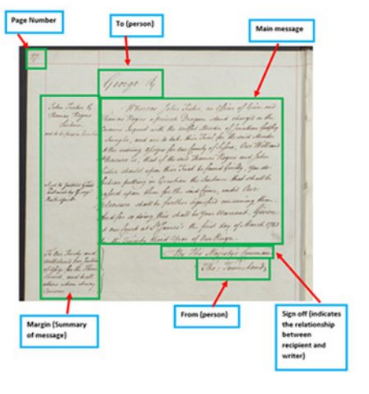
- Computers read bytes to render on your screen in a similar way to how we might read a letter. A pre-known structure that helps disseminate the information.
 |
| How humans read a file |
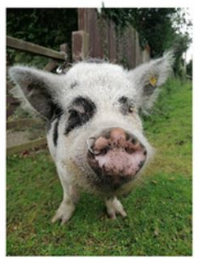 |
 |
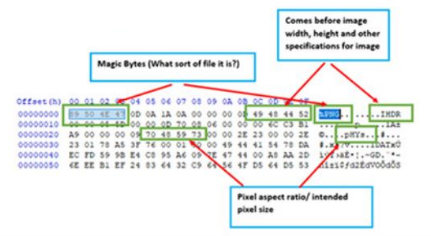 |
| How computers read a file |
Famous Byte sequences
D0CF11E0IIMMGIF89a-
PKThese are all ‘Magic Numbers’ - sequences that the format developers have chosen for quick identification of their file formats.
- Microsoft Office
- TIFF
- Also TIFF!
- GIF
- ZIP
Magic numbers: your first file format signatures
You will begin to recognize these sequences in your file format research!
Putting it together
Can you use the ASCII table above to construct a byte-sequence?
Challenge
Write down the hexadecimal sequence for “Hello world”.
48 65 6C 6C 6F 20 77 6F 72 6C 64- Hexadecimal is a number system.
- Hexadecimal makes it easier to understand “binary”.
- Hexadecimal is mapped to signals and characters that have meaning to a computer.
- Hexadecimal can take on arbitrary meaning through “encodings”.
- Hexadecimal is the foundation for a PRONOM signature!
Content from Using a hex editor
Last updated on 2026-09-08 | Edit this page
Overview
Questions
- What is a Hex Editor?
- Why use a Hex Editor?
- How do I understand the layout?
- How can I keep my data safe when using a Hex Editor?
- How do I use a Hex Editor?
Objectives
- Introduce Hex Editors
- Understand how they work
- Understand what they’re used for
- Understand what I’m seeing
- Highlight and reinforce good, safe practice
- Get hands-on
Introducing HexEd.it
HexEd.it is a web-based Hex Editor and should prove incredibly useful in your future signature development adventures!
- Find it at: HexEd.it
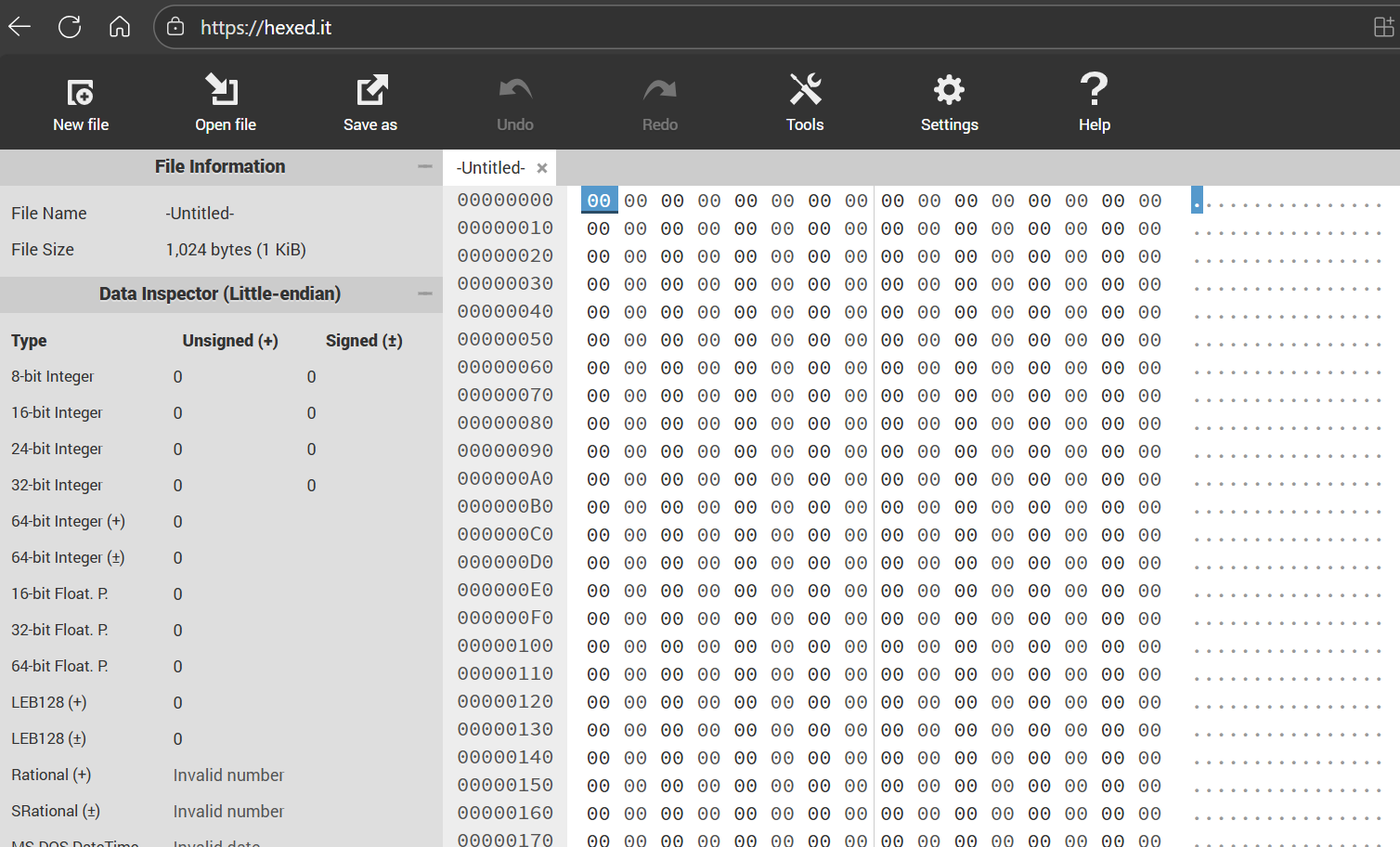
Always be careful when uploading files to pages on the web.
Hexed.it has been selected as a client-based hexadecimal browser meaning that all processing is done in the browser and nothing is sent to any other computers, i.e. the server.
You can confirm its status by checking the tool’s user manual under “? Help” on the hexed.it website. You can also use airplane mode while using the page to confirm that it still functions as expected.
What is a Hex Editor?
- Byte-level representation of digital file
- Typically displays both Hexadecimal, and ASCII/ANSI representations of data
- Enables direct editing of data values (This can be dangerous!)
Why use a Hex Editor?
- File forensics
- Reverse engineering
- Understanding file formats at a low-level
- Cheating in video games!
How do I understand the layout?
- Offset values show the position of data within the file
- Offsets also use hexadecimal notation, and start at offset 0 (or 0x00)
- The byte at Offset 0x00 is the first byte; Offset 0x0A is the 11th byte; Offset 0x4000 is the 16,385th byte!
- Hexadecimal view shows binary data represented as bytes (8 bits per byte)
- ASCII view shows text interpretation of data
- Text on ASCII side may appear ‘scrambled’ - this suggests binary encoded data, and some bytes, known as control characters, don’t translate to ASCII at all! These instead might be represented as a blank space or a dot glyph.
- Some Hex Editors (like this one) can suggest different interpretations of blocks of data
- Some Hex Editors allow for text interpretations (character sets) other than ASCII, such as EBCDIC
Safety first!
- A (local) hex editor allows for the direct manipulation of data within digital files (note, this isn’t really any different from Notepad in this regard)
- Possible to make mistakes and accidentally save over your data
- Therefore: Always work on a copy of your data, never the original data
Using the Hex Editor
Demoing ‘Hello World!’ text file
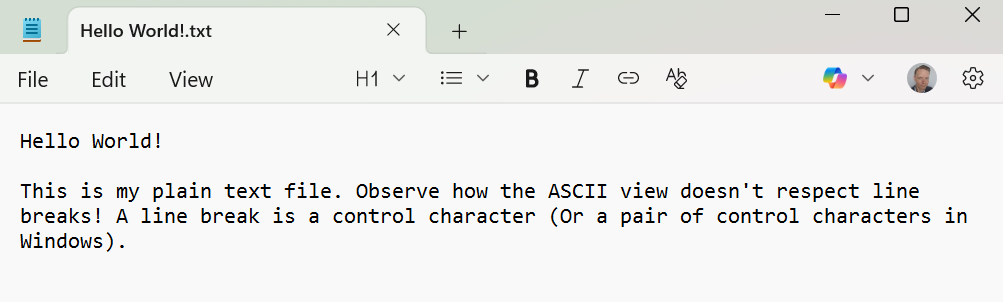
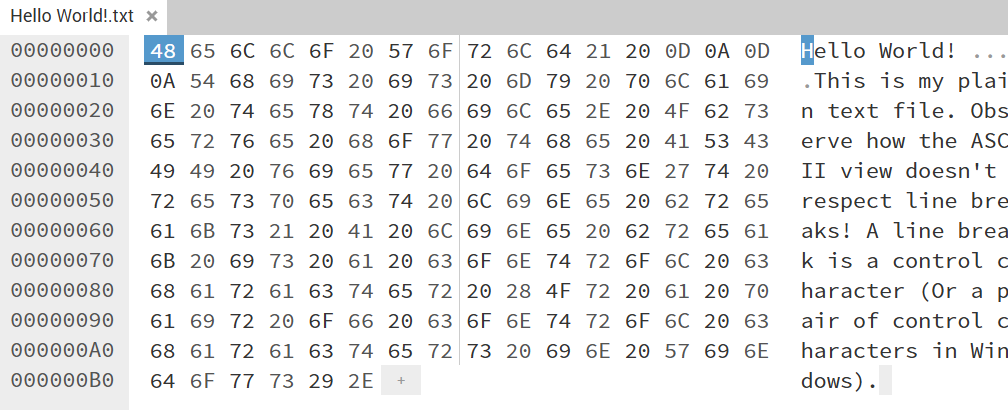
Sample file
You can take the sample file and view it in the hex editor for yourself.
-
Hello World!.txt (MD5:
44d63b2ec6c79739ce994597e1d66d84)
Demoing PDF
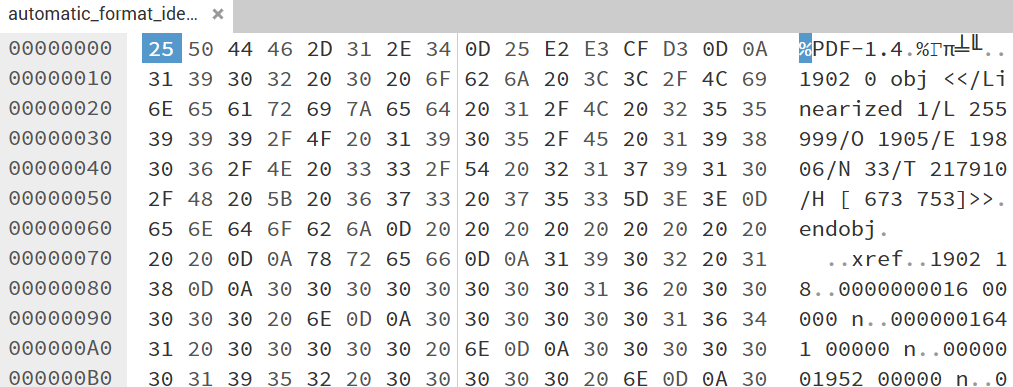
Your turn
- Drag a file of your choosing into your Hex Editor
- Tell us what you’ve observed!
Suitable workshop files can also be found on the front page of this site.
- The ASCII view of a plain text file might look sensible
- The ASCII view of an image or other ‘binary’ file may have some parts that are human readable, but will mostly seem noisy!
- HexEd.it is an online Hex Editor. HxD is a popular desktop alternative
- Hex Editors display a byte-level representation of file - both Hexadecimal and ‘ASCII’
- The ASCII view can be limiting because not every byte translates directly to a human-meaningful character. E.g. 0x00-1F control characters are usually represented as periods (dots) or spaces
- Hex Editors are used in File Forensics, reverse engineering, understanding file formats at a low-level
- Remember Safety First - it’s called an ‘editor’ for a reason, so to avoid the risk of corrupting your own originals, always work with a copy of your original files
Content from Looking for patterns
Last updated on 2026-09-21 | Edit this page
Overview
Questions
- Do my samples have the same “magic” numbers?
- What version do these files represent?
- Do I need more samples to draw conclusions?
- Do I have access to a format specification?
Objectives
- Recognize patterns in sample files.
- Have more confidence in deciding which values to use in a signature.
- Read a format specification and draw conclusions.
Exploring file types
With a hex editor you can now explore all file types regardless of
format. This comes in handy when exploring files which don’t seem to be
identify with existing tools. You can quickly open the file to view the
hex byte sequences and start to understand the format of the file.
Opening a single file in a hex editor can be illuminating or
seem like you just entered the Matrix.
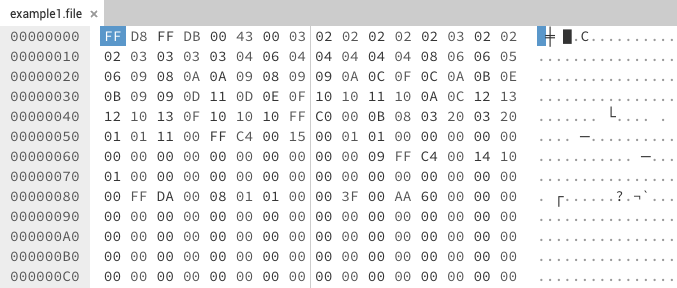
In this example we don’t really know much about the file as the extension is not known and there is no human readable text to help. So by itself this file is hard to identify.
Searching for the bytes
We can take some of the byte sequences and use search engines to try and find references to the sequences as one solution or if you have additional files with the same extension you can use them to compare.
Comparing samples
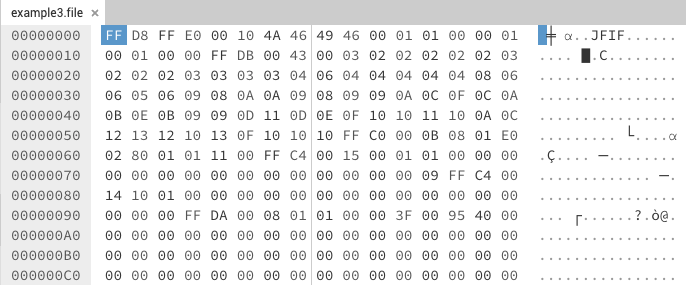
With a second file we can start to see differences and similarities
between them. The most noticeable is the first two bytes “FF D8”. This
second example also has a bit of human readable text which can also help
in identification. The more samples you have the more confident you can
be in choosing a byte sequence to use for a signature.
You may
find patterns that work with some of your samples but not with others,
Choosing a byte sequence too short may clash with other file formats,
but sequences too long may be too strict. Your sample files may
represent files saved with different versions of the same software which
can alter their structure. This can be helpful if you want to identify a
file down to the version of the software which created it.
Creating samples
Finding additional samples helps increase signature accuracy, but another option to increase your sample set is by creating sample files using original software, or trial versions of original software. Creating samples from original software also increases ability be version specific, if needed, in the signature. Also, look for tutorials and sample files on installer disks.
Referencing the specification
Having a file format specification can be the most helpful in understanding a file format, but isn’t always available. In the case of the example files above, we can see in the T.81 specification for compressed images, the “FF D8” sequence is used as the start of image bytes for a JPEG file. The specification also gives us what should be at the end of the file as well, “FF D9”.
| 0xFFD8 | SOI | Start of image |
| 0xFFD9 | EOI | End of image |
| 0xFFDA | SOS | Start of scan |
| 0xFFDB | DQT | Define quantization table(s) |
| 0xFFDC | DNL | Define number of lines |
| 0xFFDD | DRI | Define restart interval |
| 0xFFDE | DHP | Define hierarchical progression |
| 0xFFDF | EXP | Expand reference component(s) |
| 0xFFE0 through 0xFFEF | APP | Reserved for application segments |
| 0xFFF0 through 0xFFFD | JPG | Reserved for JPEG extensions |
| 0xFFFE | COM | Comment |
0xFFD9
As you progress further into this research, you will want to find sample files. There may be some samples known to you. Finding samples from heterogeneous sources can help to remove biases in signatures and ensure that your work is globally applicable and not just local.
Resources for finding Sample files
Tyler has developed a resource for helping to find sample files for format identification research.
- The more samples from different versions of the format can ensure better identification.
- Not all formats have available specifications
- The more variations in samples, patterns emerge.
Content from Introducing PRONOM syntax
Last updated on 2026-09-21 | Edit this page
Overview
Questions
- Why does PRONOM need syntax?
- What syntax exists?
- What does the syntax enable us to do?
Objectives
- Understand how PRONOM-based identification works
- Write our first PRONOM compliant signatures
- Learn what a “BOF” is
Introduction to PRONOM syntax
- PRONOM needs syntax to enable the expression of format identification signatures
- Needs to articulate specific byte patterns, at specific locations
- Syntax has overlap with ‘Regular Expressions’ (RegEx) but is distinct from RegEx implementations in common code languages such as Java or Python
- Highly flexible!
Signatures and sequences
- Every File Format in PRONOM has a PRONOM Unique ID (PUID)
- A PUID can be associated with one or more signatures
- A PUID without any signatures will only identify based on its format extension
- A File Format ID tool will return a hit if any signature fully matches
- A signature consists of one or more ‘sequences’
- All sequences for a given signature need to match to return a hit
Signature syntax conventions
- Byte patterns use hexadecimal notation (but they don’t use a ‘0x’ prefix!)
- Byte patterns can’t use space characters: use ‘ABCD’, not ‘AB CD’
- Use upper case symbols in signature sequences: ‘AB12CD34’, not ‘ab12cd34’
Signature positions
- BOF: Beginning Of File - the signature sequence starts at, or near the beginning of the file
- EOF: End Of File - the signature sequence starts at, or near the end of the file
- Var: Variable - the signature sequence may be found anywhere within the file
- Offset - the position, relative to the BOF, or EOF, where the sequence begins. 0 is default, meaning no offset. Since an offset of 0 means ‘starting from the first byte’, an offset of 4 means ‘starting from the 5th byte’, or ‘after the 4th byte’
- Maximum Offset - A further offset, relative to the initial Offset value described above. The default is 0, meaning no further possible offset.
Position and offset examples
BOF, Offset 0, Maximum offset 0: The signature sequence starts at the very beginning of the file
BOF, Offset 4, Maximum offset 0: The signature sequence starts at exactly position 0x04, the 5th byte
BOF, Offset 0, Maximum offset 4: The signature sequence may start anywhere within the first 5 bytes
BOF, Offset 4, Maximum Offset 4: The signature sequence may start anywhere from byte 5 through to byte 9
EOF, Offset 4, Maximum Offset 0: The signature sequence ends exactly 4 bytes from the end of the file
EOF, Offset 4, Maximum Offset 4: The signature sequence may end anywhere from 4 bytes to 8 bytes from the end of the file
Challenge
- Where can the byte sequence appear for BOF, Offset 16, Maximum offset 16?
- Given a file wholly consisting of the bytes
AABBCCDD, which 2 of these PRONOM byte sequences would match?
- BOF, Offset 0, Maximum Offset 4: AABBCCEE
- BOF, Offset 2, Maximum Offset 0: CCDD
- EOF, Offset 0, Maximum Offset 0: EE
- Variable: BBCC
- Anywhere from byte 17 to byte 33
- 2 & 4. The file doesn’t contain the bytes 0xEE, which appears in the target sequences of both 1 & 3.
Most common syntax
| Syntax element | Intended use | Example |
|---|---|---|
| Literal sequence | Just a plain signature sequence that appears as-is | A1B2C3D4 |
Infinite wildcard: *
|
The following sequence will appear at any point further in the file | A1B2C3D4*E5F6A7B8 |
Precise wildcard: {n}
|
The following sequence will appear after exactly the number of bytes specified | A1B2C3D4{4}E5F6A7B8 |
Wildcard range: {m-n}
|
The following sequence will appear at some point between the number of bytes specified | A1B2C3D4{4-8}E5F6A7B8 |
Either/Or: (a|b)
|
The following sequence will be any of the sequences specified. Any number of sequences can be specified | A1B2C3D4(0D|0A|0D0A)E5 |
Byte range [a:b]
|
The next byte will be within the range specified | A1B2C3D4[A4:B0]E5 |
Most signature sequences will combine some or all of the above.
Less common syntax
| Syntax element | Intended use | Example |
|---|---|---|
NOT sequence: [!a]
|
The following byte value is not this byte | A1B2C3D4[!E5]F6 |
Wildcard with infinite range:
{m-*}
|
The following sequence will appear minimally after the first value specified, but otherwise anywhere else in the file | A1B2C3D4{4-*}E5F6A7B8 |
Single wildcard: ??
|
The following byte may have any value. This is functionally
equivalent to {1}
|
A1B2C3D4??E5F6A7B8 |
NOT Byte range [!a:b]
|
The next byte will not be within the range specified | A1B2C3D4[!A4:B0]E5 |
| Wildcards at a beginning of a BOF sequence, or end of an EOF sequence | This is functionally equivalent to specifying Offset/Maximum Offset, however this is not recommended |
{4}A1B2C3D4 or: {0-4}A1B2C3D4
|
PRONOM Simplified Cheatsheet
PRONOM terms, basic syntax and data model
Offset markers
BOF = Beginning of File
EOF = End of File
Var = Variable (anywhere in the file)
Offset/Max Offset = Exact or positional range in which a signature starts
Combining sequences
- As described earlier, a format can have many Signatures - matching any Signature will return a hit
- A Signature may consist of any number of BOF, EOF, and Var sequences. All sequences within a Signature must match to return a hit
- Any BOF, EOF, or Variable sequence can include any syntax elements described above
- Signature sequences must be logically positioned differently, so you couldn’t have two BOF sequences with offset 0, maximum offset 0 specifying distinct values because a single file could never hold two distinct sequences at the same position, but if two sequences had BOF, offset 0, maximum offset 128, then both sequences must appear within the first 128 bytes
- Most commonly, a signature sequence will only have a BOF sequence - this is fine!
- Be wary with purely Variable-positioned sequences - in isolation they will cause the whole of your files to be scanned, so it’s always best to include either a BOF or EOF as an ‘anchor’
PRONOM in Practice
The team at The National Archives have worked hard to create good resources for PRONOM research and development. The PRONOM in Practice guide is an important set of documents to follow up on after this tutorial.
Challenge
Here is a real-world signature example taken from PRONOM:
- Position type: Absolute from BOF
- Offset: 0
- Value:
FFD8FFE0{2}4A464946000100(00|01|02) - Position type: Absolute from EOF
- Offset: 0
- Maximum Offset: 65536
- Value: FFD9
What are some features of this signature that you can spot?
- There are two sequences, both BOF and EOF
- The EOF sequence has an offset range, so the sequence can be found anywhere within the last 65,536 bytes of the file
- The BOF sequence has a specific wildcard
{2} - and a three-choice either/or block
(00|01|02)
- A PRONOM file format (PUID) can be associated with more than one signature, but only needs to match one full signature to return a positive hit
- A signature can consist of multiple sequences, and all sequences must match to return a positive hit
- PRONOM syntax is a form of regular expression (regex), although distinct from regex implementations in Java, Python etc.
- PRONOM sequences can be anchored relative to the beginning of the file (BOF), the end of the file (EOF), or anywhere within the file (Variable), however it is best practice to include at least one BOF or EOF anchor to avoid unnecessary full scans of files
- PRONOM syntax can be combined in multiple ways
- Sometimes there is more than one way to write a signature
Content from Reversing PRONOM syntax
Last updated on 2026-09-21 | Edit this page
Overview
Questions
- How do I understand if something should match a PRONOM signature?
- How do I translate syntax into a file?
Objectives
- Create a sample byte-sequence for a given signature.
Reversing PRONOM syntax
As you write more signatures you begin to develop a need to debug yours, and existing signatures.
It can be useful to work backwards from a PRONOM signature to create an outline digital file that triggers a signature’s patterns.
These outline digital files are called skeleton files.
Challenge
Given the sequence:
AABB??CC{4-10}DD*010203
Can you write a byte sequence that will match in DROID?
AABB00CC00000000DD00010203

AABB  00  CC  00000000  DD  00  010203
↑ ↑ ↑ ↑ ↑ ↑AABB00CCBA5EBA11F00DDD00000000010203
AABB 00 CC BA5EBA11F00D DD 00000000 010203
↑ ↑ ↑ ↑ ↑ ↑ ↑ ↑ ↑ ↑ ↑Hexadecimal byte sequences must have an even number of characters, i.e. one byte is always two characters.
You can jot down byte-sequences in any notepad application you have available to you (even google docs!).
Editors that use monospace fonts such as Roboto, Consolas, or “Source Code Pro” work well because every character used occupies the same amount of horizontal space making it easy to compare uneven sequences and lines.
- You can copy and paste the bytes into a hex editor. As we’ve seen, these are usually split into two panes, one for bytes and one for a representation of bytes in ASCII or another encoding.
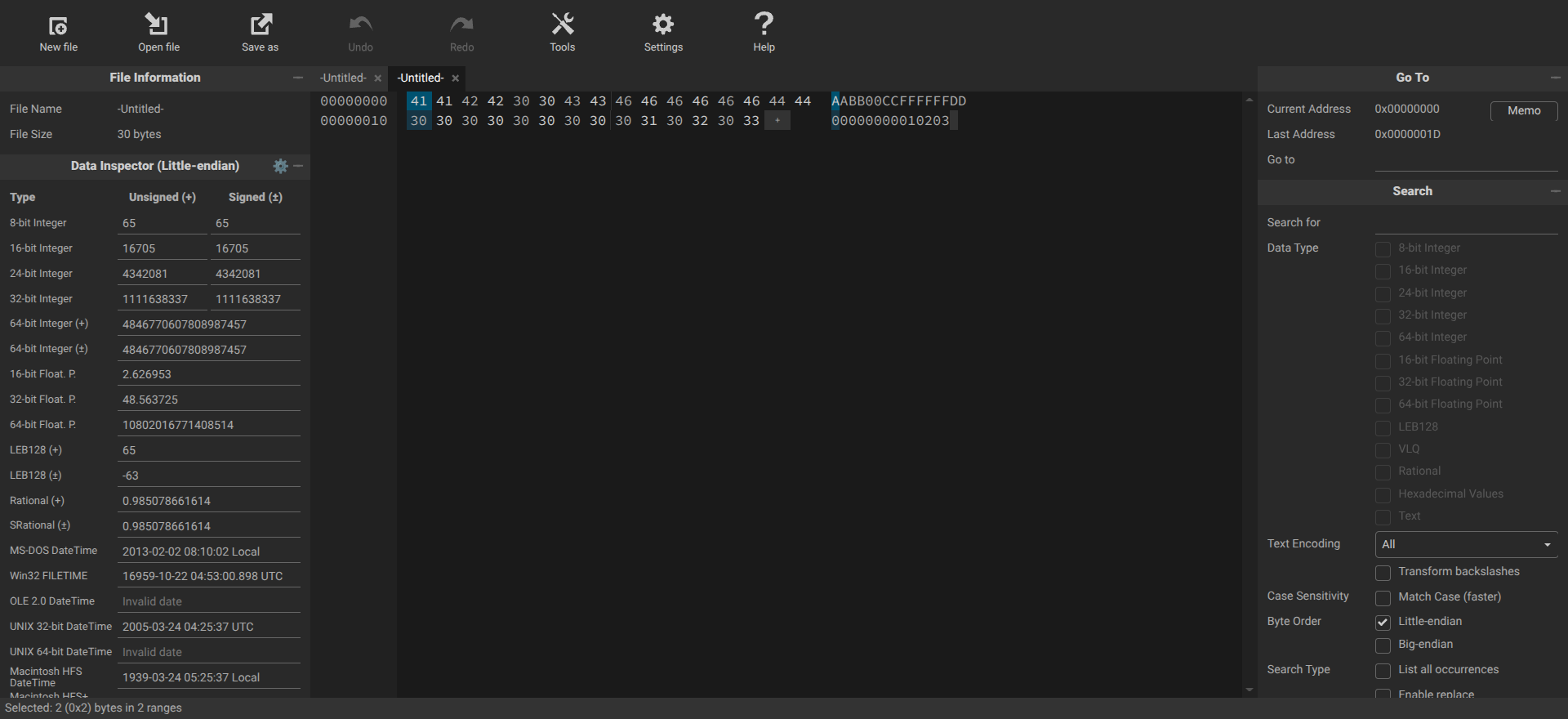
Try it!
Try it on https://hexed.it/ if you have a moment.
- Take one of the solutions above and copy it into your clipboard.
- Click anywhere in the editor pane and press ctrl-v.
- Select “create new file” and specify how the data should be interpreted as “hexadecimal values”.
- You will see the bytes from the solution in the left hand side of the window and its ASCII interpretation on the right.
- You can then elect to download and name the file via ‘Save As’.
- (Optionally) verify the content on disk with a local hex editor or a new hexed.it window.
Challenge
Create a skeleton file using the bytes
5A5854617065211A01 and run it against DROID, FIDO, or
Siegfried, what PUID do you get?
fmt/1000 ZX Tape Format
There are no concrete rules for how to convert a PRONOM signature into a skeleton file.
A good rule of thumb is to always convert wildcards and unknown values ( *, ??, {n}, {n-m} ) to zero bytes as they will help make it easier to see how the file is spaced out.
For sequences described by PRONOM as optional or belonging to one out of a set of values ( (aa|bb), (aa|bb|cccc), (aaaa|ffff) ) you only need to select one byte or set of bytes..
It’s a good idea to create some space between sets of sequences, for example between BOF and EOF sequences. Pick a number between 1 and 20 bytes (or as many bytes as you like) and enter that many null bytes between sequences.
Observe the way the skeleton file (bytes) below is spaced where zeros are used to replace wildcards in the signature.
| Skeleton file | 41 75 74 6F 43 41 44 20 42 69 6E 61 72 79 20 44 58 46 0D 0A 1A 00 00 00 00 00 00 00 00 00 00 00 00 00 00 00 00 00 00 00 00 00 00 53 45 43 54 49 4F 4E 00 02 48 45 41 44 45 52 00 00 00 00 00 00 00 00 00 00 00 00 00 00 00 00 00 00 00 00 00 09 24 41 43 41 44 56 45 52 00 01 41 43 31 30 31 32 00 00 00 00 00 00 00 00 00 00 00 00 00 00 00 00 00 00 00 00 00 00 45 4E 44 53 45 43 00 00 45 4F 46 00 |
| BOF | 4175746F4341442042696E617279204458460D0A1A00*0053454354494F4E0002{0-1}48454144455200*09{0-1}24414341445645520001{0-1}41433130313200*00454E4453454300 |
| EOF | 00454F4600 |
| Format | fmt/82: Drawing Interchange File Format (Binary): R13 |
- You can always measure your success in creating a skeleton file against the signature itself. Once you’ve created a good skeleton file it will match the signature that you are investigating.
Making use of skeleton files
Skeleton files have different uses. They enable us to:
- Test signatures.
- Identify false positives and multiple-identifications.
- Test the different format identification implementations.
- Share our work with the PRONOM team in lieu of sample files (or in support of).
Your resource for skeleton files
Siegfried’s build process uses a set of skeleton files and stores them in a repository called builder. You can find those at the link below.
- A file you have created by reversing a PRONOM signature is called a skeleton file
- You can reverse engineer PRONOM signatures to investigate existing patterns and existing files
- By comparing sequences in skeleton files and seeing how they align with known files in the hex editor you can understand if a pattern should match if it is not always obvious, e.g. due to complexity
- Reversing PRONOM syntax has other uses, e.g. creating skeleton files.
Content from Creating signature files
Last updated on 2026-09-21 | Edit this page
Overview
Questions
- What’s a signature file?
- How do we create one?
Objectives
- Create a signature file.
- Investigate the internals of a signature file.
Making it work with DROID and Siegfried
You now have a sequence you think will work with your format and understand the syntax needed. How do we get that sequence into something DROID or Siegfried can use?
We 💜 Fido
We’re not forgetting Fido! It just uses a slightly different approach to allow us to use our new signatures and so it’s not yet included in the tutorial. We can add this in future or can happily take a submission (pull-request) to add it to the information below.
What is a signature file?
A signature file is a representation of the byte sequence, written in a way tools like DROID or Siegfried can use to match the byte sequence within a file or group of files. This pattern is written to an XML structure which records the sequence, offsets, and descriptive information about the file.
XML
<?xml version="1.0" encoding="UTF-8"?>
<FFSignatureFile xmlns="http://www.nationalarchives.gov.uk/pronom/SignatureFile" Version="1788353362" DateCreated="2026-09-02T12:49:22+00:00">
  <InternalSignatureCollection>

    <InternalSignature ID="1" Specificity="Specific">
      <ByteSequence Reference="BOFoffset">
        <SubSequence MinFragLength="0" Position="1" SubSeqMaxOffset="0" SubSeqMinOffset="0">
          <Sequence>FFD8</Sequence>
          <DefaultShift>3</DefaultShift>
          <Shift Byte="FF">2</Shift>
          <Shift Byte="D8">1</Shift>
        </SubSequence>
      </ByteSequence>
    </InternalSignature>

  </InternalSignatureCollection>
  <FileFormatCollection>

    <FileFormat ID="1" Name="Example JPG signature" PUID="dev/1" Version="1.0" MIMEType="image/jpeg">
      <InternalSignatureID>1</InternalSignatureID>
      <Extension>jpg</Extension>
    </FileFormat>
  </FileFormatCollection>

</FFSignatureFile>
A Signature file consists of two parts, the byte signature and the file format information. The signature will have an ID which is then referenced in the file format information tag, connecting the two.
This file can be created from scratch using any text editor, but nobody wants to do that, let’s look at the amazing tool Ross Spencer wrote to help with signature creation.
Signature development utility
The signature development utility will take the sequence you want to
use and generate the XML needed by tools like DROID to use. Use a name
which is specific to the format. If you know the version of the format
the sequence describes, you can add it as well, but if you are unsure,
leave it blank. The form has a place for the extension, and if there is
more than one, we can add that later in the XML directly. Many formats
have a mime-type, some official, others not so official, add the type
here if it is commonly used.
Add your sequence and anchor it at
the beginning of the file or end of file, then add any offsets if
needed. You can always add additional sequences to add more accuracy to
the signature.
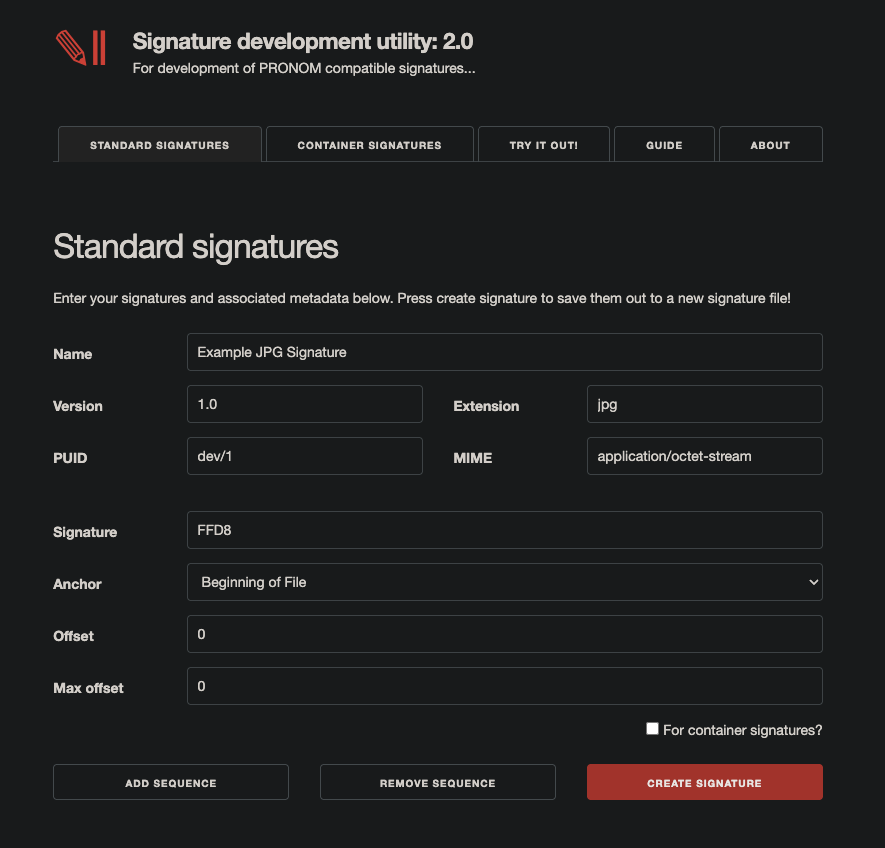
Pressing the “Create Signature” button will generate an XML
file based on your information and immediately download to your
computer.
You can now enable this signature file in tools like DROID and Siegfried. We’ll help you do this in the next section.
Now you’re ready to run your signature file against real files!
- A signature file is a set of instructions for DROID.
- You can create signature files using the Signature Development Utility.
- A signature file is separated into sections.
- One section is used for metadata about identification results.
- Another section is used to store the instructions for identification.
Content from Plugging it in
Last updated on 2026-09-16 | Edit this page
Overview
Questions
- How do we use a signature file?
- Should I use DROID or Siegfried?
Objectives
- Be able to use a signature file with your preferred tool.
Plugging it in – the easy way!
Once you have created a signature file you will want to plug it into your preferred tool to test it against your files.
For this workshop we have developed a method of doing this through your web-browser using Siegfried.
Roy!
Roy is a Siegfried companion tool and it enables us to compile signatures alongside an existing DROID signature file. Siegfried then allows us to run those signatures against our files.
Visit ffdev.info to get access to an browser-based version of Roy, and Siegfried for this next step!
Visit Richard’s IT For Archivists for the full version of Siegfried and all his other diigtal preservation tools.
 |
| Image of Siegfried at work at IT for Archivists |
WASM
This online version of Roy, and Siegfried uses Web Assembly (WASM) which means everything is loaded locally in your browser. With Siegfried running locally in your browser data is not transferred over the network to any other computer, it is sandboxed and kept local to your machine.
- Go to ffdev.info and look at the Siegfried tab.
- Select “roy: load signature’ and navigate to a signature file on your hard disk. The signature file will be loaded into memory alongside Siegfried’s default signature.
- Now click “Siegfried: File ID” and select your test files (or signature file) and click okay.
- Siegfried will attempt to identify your file and should display a result matching your signature file’s metadata.
- Congratulations, you’ve managed to create your first signature file and successfully identified your files using Siegfried.
Browser compatibility
One limitation of the WASM build of Siegfried and Roy is that it doesn’t work in Firefox and Safari because of differing levels of support for the HTML File Picker.
It should work in Chrome, Edge, Opera, and a handful of other browsers.
If you experience any difficulties, check out Mozilla’s resource on browser compatibility.
Plugging it in with local tools
You may want to avail yourself on how to do this using your local tools. We go into this in detail below for DROID and Siegfried.
- the following assumes that you have either DROID or Siegfried installed locally.
- the instructions assume some familiarity with running both tools and getting forrmat identifications out of them.
DROID
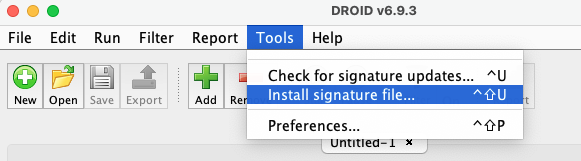
- With DROID installed you will find its configuration folder in
%userprofile%/.droid6/on Windows and~/.droid6on Linux and Mac. Folders may be hidden. - Signature files are stored in a folder called signature_files.
- Given your signature file created above, copy and paste it into this directory.
Naming conventions
At time of writing there are no known limitations on the filename you use here.
- Once you have done this, launch DROID locally as you would normally.
- Once DROID has loaded, navigate to
tools->preferences. - From the binary signatures drop-down look for your signature filename (it will be minus the xml suffix).
- Click ok to accept the changes.
- While DROID opens a profile when it first loads, your new signature file is not yet loaded into memory and so will not function in the currently open profile.
- Open a new profile by pressing ‘New’ it should open as Untitled-2 if you have no other existing profiles.
- You can now add files using ‘Add’ and attempt to identify these files against your new signature file.
- You can read more in the DROID user guide.
Siegfried
- Run
sf -updateto ensure that a siegfried configuration folder has been created. - Attempt to run roy build -nocontainer -noreports. If this fails,
download the latest DROID signature file into the folder described in
the error message by roy, e.g.
%userprofile%/siegfried/on Windows or~/.local/share/siegfried/on Linux and Mac (configurations may vary). - You can download the latest signature file from The National Archives: DROID signature files.
Keeping it simple
This method allows us to test out signatures. We’re focusing on
building a signature file using just the DROID signature file here,
however it is possible to build a more comprehensive signature with roy.
You can use a PRONOM download by using ./roy harvest, then
by downloading the most recent container file to the same siegfried
folder above. See the siegfried documentation for more information on
building signatures.
- Once you have verified you can build a signature with roy, you need
to add your own signature file to the collection, you can do this as
follows:
./roy build -extend </path/to/your/signature/file.xml>. - Given no errors you can now run siegfried against your own files and they should identify against your new signature file!
- For more information on building signatures with siegfried and roy, check out siegfried’s wiki: roy: inspect and debug.
- You can use any tool!
- There are different merits to each.
Content from Doing it for yourself
Last updated on 2026-09-21 | Edit this page
Overview
Questions
- Can you apply what you’ve learned?
Objectives
- Develop a signature.
- Create a signature file.
- Test the signature file against the workshop test files!
Doing it for yourself
Now that you’ve seen everything there is to know about writing file format signatures and plugging them in, it is time to write one!
If you are doing this in a workshop environment, follow this thread. If you are following along at home in a tutorial, then skip to the small exercise below to find a task that you can complete at home.
Workshop exercise
- Split into groups.
- Work together to create a signature.
- Plug it into DROID/Siegfried
- Good luck!
You can do it!
Many of us have been developing file format signatures for years now and so if you’re new to this you will likely have questions. Your mentors are available to help guide your efforts. There will also be an opportunity at the end to discuss how things went.
Quite ok!
Your task is to find an identification for the Quite OK Image format. Below you will find a specification and some sample files. Take a look at these in any order you wish to determine what may provde to be a good file format signature for this new file format!
Specification
- QOI Specification also online here.
Local exercise
The following challenge is simply to try and write a DROID compatible signature file that can be used to identify three byte sequences designed for this tutorial. There are sample files available, and all you have to do is match all three!
Develop a signature for the following and test it in DROID or Siegfried
56 45 52 53 49 01 4E 00 00 32 30 30 32 00 00 00 00 00 43 48 41 52 53 45 54 00 00 61 73 63 69 69 00 00 00 00 00 00 00 00 00 00 00 00 00 00 25 45 4F 46
56 45 52 53 49 02 4E 00 00 32 30 30 32 00 00 00 00 00 43 48 41 52 53 45 54 00 00 75 74 66 2D 38 00 00 00 00 00 00 00 00 00 00 00 00 00 00 25 45 4F 46
56 45 52 53 49 03 4E 00 00 32 30 30 32 00 00 00 00 00 43 48 41 52 53 45 54 00 00 75 74 66 2D 38 00 00 00 00 00 00 00 00 00 00 00 00 00 00 25 45 4F 46
There are a number of consistent pattterns you can probably use to identify this bytestream (file), there are no wrong answers on such a small sample so don’t worry. In real world research we will try and find a reasonable number of samples with enough variance to test the hypothesis that are our signature files.
One possible solution
56 45 52 53 49 (01|02|03) 4E 00 00 32 30 30 32 00 00 00 00 00 43 48 41 52 53 45 54 00 00 (61 73 63 69 69|75 74 66 2D 38) 00 00 00 00 {0-10} 00 00 00 00 00 00 00 00 00 00 25 45 4F 46
- (01|02|03) - we see versions change here so we use option syntax, this could also be a lexicographic check or a check for a single byte.
- (61 73 63 69 69|75 74 66 2D 38) - two character encodings are listed across three files so we choose between one or the other.
- {0-10} - there’s some arbitrary length information here where the files are otherwise the same. We don’t know how much this will vary so to be safe we’ve elected for zero to 10 bytes, but this could easily be limited to three, or changed to be a full variable length wildcard.
Formatted for the signature development utility
5645525349(01|02|03)4E0000323030320000000000434841525345540000(6173636969|7574662D38)0000 0000{0-10}0000000000000000000025454F46As XML for testing with DROID/Siegfried
XML
<?xml version="1.0" encoding="UTF-8"?>
<FFSignatureFile xmlns="http://www.nationalarchives.gov.uk/pronom/SignatureFile" Version="1788520000" DateCreated="2026-09-04T11:06:40+00:00">
  <InternalSignatureCollection>
    <InternalSignature ID="1" Specificity="Specific">
      <ByteSequence Reference="BOFoffset">
        <SubSequence MinFragLength="6" Position="1" SubSeqMaxOffset="0" SubSeqMinOffset="0">
          <Sequence>5645525349(01|02|03)4E0000323030320000000000434841525345540000(6173636969|7574662D38)0000 0000{0-10}0000000000000000000025454F46</Sequence>
        </SubSequence>
      </ByteSequence>
    </InternalSignature>
  </InternalSignatureCollection>
  <FileFormatCollection>
    <FileFormat ID="1" Name="FFDEV Workshop Signature" PUID="ffdev/1" Version="1.0" MIMEType="application/octet-stream">
      <InternalSignatureID>1</InternalSignatureID>
      <Extension>file</Extension>
    </FileFormat>
  </FileFormatCollection>
</FFSignatureFile>Taking note of the extension
You can also record a file format extension in a signature file. If you correctly match the file format extension then tools like Siegfried and DROID will highlight that the file has the correct extension and if a file presents with the incorrect extension they will often warn about that as well.
Wrapping up!
If you have managed to identify the three sample files using your own signature file, congratulations!
If you’re still wrestling with it, take a look at the solution and see if you can plug it into Siegfried and make it work. Take note of how the solution works or how you think it works and have a think about what wasn’t quite working in your own answer.
We’ll wrap up in the next lesson.
- You’ve all the tools needed to write file format signatures.
- It might not always work.
- It will certainly take trial and error.
- Persevere and keep working on it.
- Practice makes perfect!
Content from Teaching us how to do it!
Last updated on 2026-09-21 | Edit this page
Overview
Questions
- Can you articulate your procedure?
- Can you identify any changes you might make to your method?
- Is there anything the workshop can be clearer about?
Objectives
- Share your process.
- Enable others to learn from your experience.
Teaching us how to do it
Now you’ve tried one, can you teach one?
If you are working on this outside of a workshop don’t worry if you don’t have a group to share with. It is still worth working through these steps to improve your understanding. Well done on getting this far!
See below for some ideas on what you might do at this point.
Teach the workshop
Following your efforts in the previous exercise can you describe to the group what you did and what you learned?
- Where did you begin your research?
- What considerations did you have when writing a signature?
- Are there any alternatives you might consider?
Evaluating your efforts:
- What worked well?
- What didn’t work?
- What questions do you still have?
- Is there anything else you’d like to share with the group?
Teach locally
Teaching outside of a workshop environment is no small feat! If you’re happy where you are, then you are welcome to wrap up this tutorial with the final two episodes.
If you are keen, however, some ideas for you to share your efforts from this tutorial might be:
- Write a blog for the Open Preservation Foundation or your own organization sharing your thoughts, e.g like Andrea’s here.
- Visit the show-and-tell section of the workshop’s repository and share your thoughts!
- Organize a show-and-tell in your organization and share your experience with your colleagues, maybe even as a teaser for running this material as a workshop for yourself!
- Seeing one, doing one, teaching one allows you to reinforce what you’ve learned.
- Teaching one helps you to externalize and formalize your language around this work making it easier to articulate in future in other forums.
Content from Advanced PRONOM
Last updated on 2026-09-21 | Edit this page
Overview
Questions
- What’s left to learn?
- What other considerations are there when documenting file format signatures?
Objectives
- Identify new learning objectives.
Priorities
Signatures will also makes use of a priority over another file format which allows tools using PRONOM to enforce a single identification for a file, e.g. Scalabale Vector Graphics (SVG) (a format based on XML) has a priority over XML to prevent SVG being identified as XML when it can be identified more specifically.
To that end, you will often see priorities over core file formats such as HTML, PDF, JPEG, TIFF, OLE2, and so on, as many other file format variants will be written on top of those.
The complete picture
When you’ve completed your efforts, a complete PRONOM record is a combination of signature & priorities & descriptive information (metadata) about the file format.
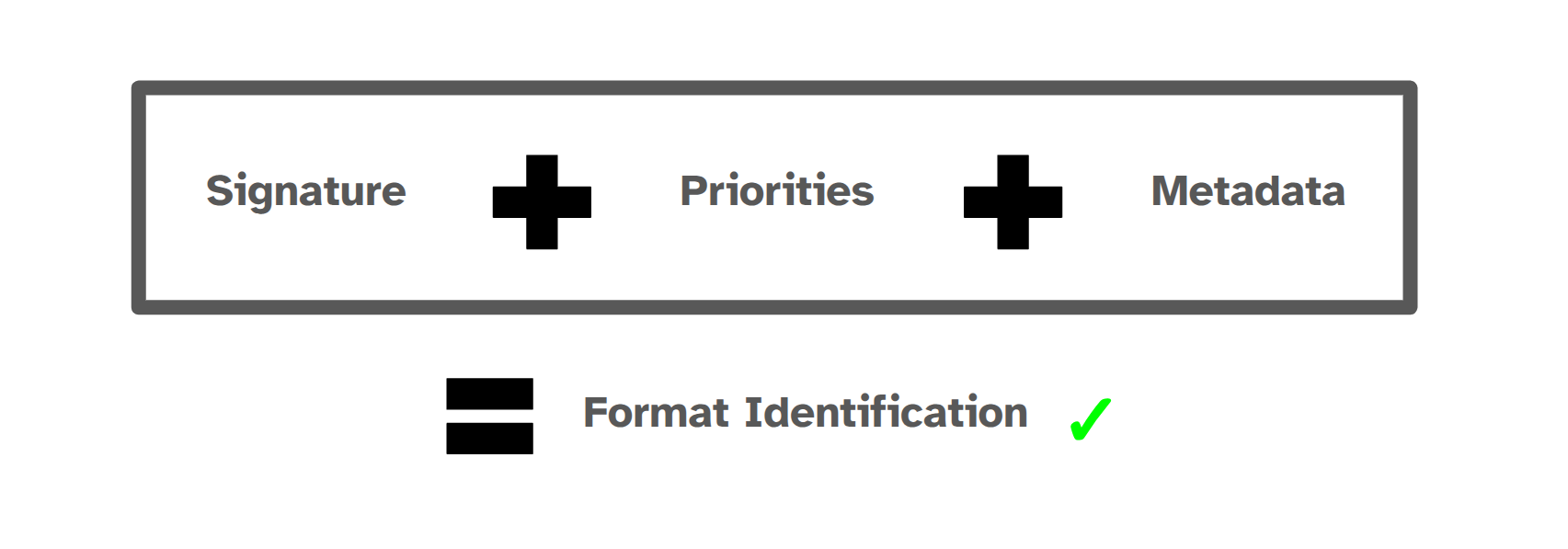
When you submit a new signature to PRONOM, you will get feel for the information they are looking for. The PRONOM team will help you.
Where to submit a signature to PRONOM
The PRONOM team prefers to receive submissions via GitHub, though if you aren’t comfortable creating a GitHub account then they can also receive information via email at
Visit this site for more information on submitting to PRONOM via GitHub.
Information to submit to PRONOM
- Format name
- Version number
- Extensions
- MIME/Media Type
- Description
- Format type
- Vendor
- File format identification signatures (preferably the sequences by themselves, the xml is only a nice addition for testing)
- Relevant links, documentation, extra information
- Credit
Of these, Format name is absolutely mandatory and the rest are nice to have, but the more information you can provide, the better! If you’ve created any file format signatures it will be useful to describe your thought process and links to any relevant documentation, such as format specifications.
Container signatures
Many of the techniques used for standard signatures and signature development can be applied to container files. Container files are formats built on top of technologies such as ZIP and OLE2 whose contents can be queried to provide more accurate identification.
Container signatures take some additional effort to research and test. We will endeavor to follow up this learning resource with a similar one containing all of the information from our previous workshop: PRONOM: What’s in the Box?
Recording your progress
The PRONOM Research repository is a great place to have discussions about file forrmats you are working on, as well as request new entries or updated ones.
Some researchers, such as Tyler, maintain their own GitHub repositories for file format research. This is useful as it provides them with a way to:
- record information,
- store sample signature files,
- store sample files.
It provides something to point to, and a way to keep track of your own efforts.
Just Solve It: File Formats, and COPTR
Two complementary resources to this work are the Just Solve It wiki by Archive Team:
And COPTR (Community-Owned digital Preservation Tool Registry) by the Open Preservation Foundation:
As you research your file formats, you might find more information about them that doesn’t sit easily on the PRONOM website. The community can benefit from this information as well.
Just Solve It: File Formats
The Just Solve It wiki primarily captures information about file formats.
Information you might record here are other details about them, including:
- links to specifications,
- links to more sample files,
- links to Wikidata records,
- software,
- and so on…
COPTR
COPTR on the other hand records information about software that can help us preserve different aspects of files and file formats.
If there are software packages connected to your format that also serve some sort of preservation purpose, e.g. provide metadata extract, then you might want to add these to COPTR’s wiki as well.
One way that both the Just Solve It and COPTR wikis benefit the community is that they are easily editable and can help us maximize the information we collect about our respective preservation challenges. They allow the community to benefit from this knowledge immediately while the PRONOM team takes the time to test and verify signature-related information and add those resources to PRONOM. They can also help us to record details early on while we still don’t have a PRONOM signature ready to submit.
- Much of this effort is researching files and writing a signature, but another big part is testing, calibration, AND documentation.
- The Just Solve It and COPTR wikis are complimentary resources that can be used as landing zones as we collect information early on about file format signatures or as we develop them.
- The FAQ and Glossary are available for quick reference whenever you need them in your signature development journey.
Content from Final thoughts
Last updated on 2025-11-02 | Edit this page
Overview
Questions
- What are the key take-aways?
Objectives
- Go ahead and look at hex!
- Next time you have an unidentified file format:
- open it up in a hex editor, and,
- take a look.
- Write a new signature and submit it to PRONOM.
- Share your knowledge with colleagues and support the next generation of file format researchers!!!
- You can even use this template and build on it to tailor yours and your colleagues’ experiences.
Survey
Help us to improve this content and future tutorials and workshops.
Questions
- What questions do you have?
- What formats might you go away and work on?
- It might look scary at first, but take your time, explore, and enjoy!
- There’s help out there.
- Keep in touch!