
Creating signature files
Last updated on 2026-09-21 | Edit this page
Overview
Questions
- What’s a signature file?
- How do we create one?
Objectives
- Create a signature file.
- Investigate the internals of a signature file.
Making it work with DROID and Siegfried
You now have a sequence you think will work with your format and understand the syntax needed. How do we get that sequence into something DROID or Siegfried can use?
We 💜 Fido
We’re not forgetting Fido! It just uses a slightly different approach to allow us to use our new signatures and so it’s not yet included in the tutorial. We can add this in future or can happily take a submission (pull-request) to add it to the information below.
What is a signature file?
A signature file is a representation of the byte sequence, written in a way tools like DROID or Siegfried can use to match the byte sequence within a file or group of files. This pattern is written to an XML structure which records the sequence, offsets, and descriptive information about the file.
XML
<?xml version="1.0" encoding="UTF-8"?>
<FFSignatureFile xmlns="http://www.nationalarchives.gov.uk/pronom/SignatureFile" Version="1788353362" DateCreated="2026-09-02T12:49:22+00:00">
  <InternalSignatureCollection>

    <InternalSignature ID="1" Specificity="Specific">
      <ByteSequence Reference="BOFoffset">
        <SubSequence MinFragLength="0" Position="1" SubSeqMaxOffset="0" SubSeqMinOffset="0">
          <Sequence>FFD8</Sequence>
          <DefaultShift>3</DefaultShift>
          <Shift Byte="FF">2</Shift>
          <Shift Byte="D8">1</Shift>
        </SubSequence>
      </ByteSequence>
    </InternalSignature>

  </InternalSignatureCollection>
  <FileFormatCollection>

    <FileFormat ID="1" Name="Example JPG signature" PUID="dev/1" Version="1.0" MIMEType="image/jpeg">
      <InternalSignatureID>1</InternalSignatureID>
      <Extension>jpg</Extension>
    </FileFormat>
  </FileFormatCollection>

</FFSignatureFile>
A Signature file consists of two parts, the byte signature and the file format information. The signature will have an ID which is then referenced in the file format information tag, connecting the two.
This file can be created from scratch using any text editor, but nobody wants to do that, let’s look at the amazing tool Ross Spencer wrote to help with signature creation.
Signature development utility
The signature development utility will take the sequence you want to
use and generate the XML needed by tools like DROID to use. Use a name
which is specific to the format. If you know the version of the format
the sequence describes, you can add it as well, but if you are unsure,
leave it blank. The form has a place for the extension, and if there is
more than one, we can add that later in the XML directly. Many formats
have a mime-type, some official, others not so official, add the type
here if it is commonly used.
Add your sequence and anchor it at
the beginning of the file or end of file, then add any offsets if
needed. You can always add additional sequences to add more accuracy to
the signature.
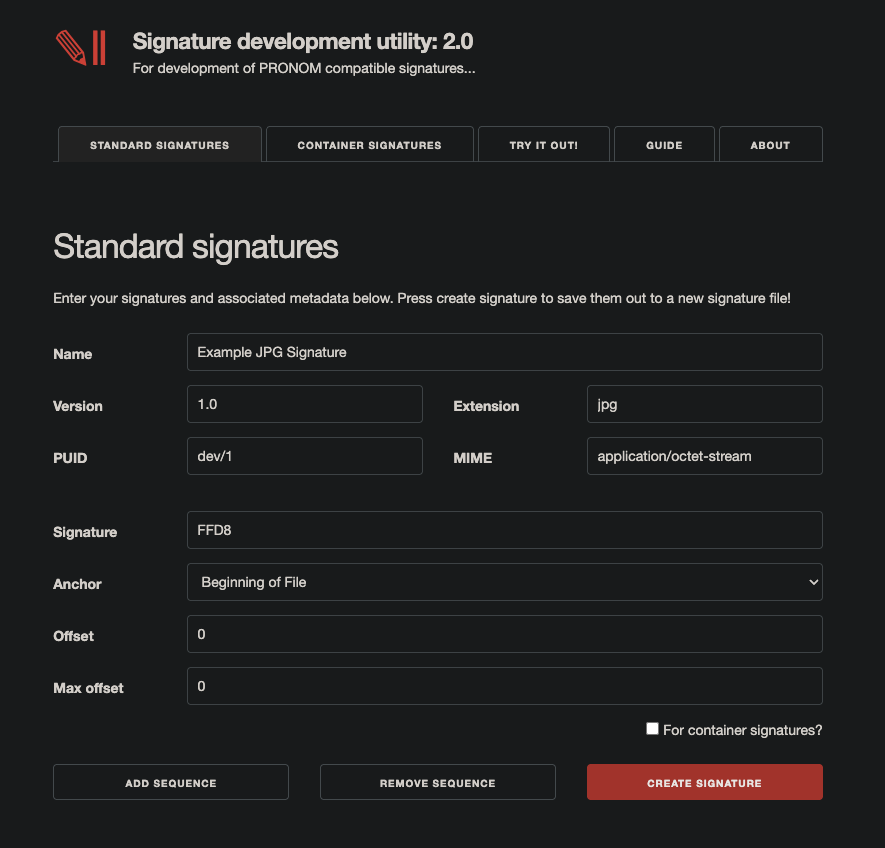
Pressing the “Create Signature” button will generate an XML
file based on your information and immediately download to your
computer.
You can now enable this signature file in tools like DROID and Siegfried. We’ll help you do this in the next section.
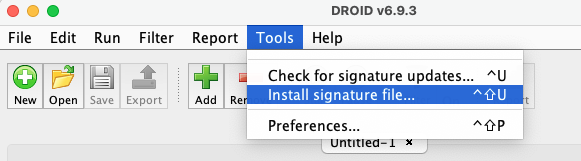
Now you’re ready to run your signature file against real files!
- A signature file is a set of instructions for DROID.
- You can create signature files using the Signature Development Utility.
- A signature file is separated into sections.
- One section is used for metadata about identification results.
- Another section is used to store the instructions for identification.