
Reversing PRONOM syntax
Last updated on 2026-09-21 | Edit this page
Estimated time: 15 minutes
Overview
Questions
- How do I understand if something should match a PRONOM signature?
- How do I translate syntax into a file?
Objectives
- Create a sample byte-sequence for a given signature.
Reversing PRONOM syntax
As you write more signatures you begin to develop a need to debug yours, and existing signatures.
It can be useful to work backwards from a PRONOM signature to create an outline digital file that triggers a signature’s patterns.
These outline digital files are called skeleton files.
Challenge
Given the sequence:
AABB??CC{4-10}DD*010203
Can you write a byte sequence that will match in DROID?
AABB00CC00000000DD00010203

AABB  00  CC  00000000  DD  00  010203
↑ ↑ ↑ ↑ ↑ ↑AABB00CCBA5EBA11F00DDD00000000010203
AABB 00 CC BA5EBA11F00D DD 00000000 010203
↑ ↑ ↑ ↑ ↑ ↑ ↑ ↑ ↑ ↑ ↑Hexadecimal byte sequences must have an even number of characters, i.e. one byte is always two characters.
You can jot down byte-sequences in any notepad application you have available to you (even google docs!).
Editors that use monospace fonts such as Roboto, Consolas, or “Source Code Pro” work well because every character used occupies the same amount of horizontal space making it easy to compare uneven sequences and lines.
- You can copy and paste the bytes into a hex editor. As we’ve seen, these are usually split into two panes, one for bytes and one for a representation of bytes in ASCII or another encoding.
Try it!
Try it on https://hexed.it/ if you have a moment.
- Take one of the solutions above and copy it into your clipboard.
- Click anywhere in the editor pane and press ctrl-v.
- Select “create new file” and specify how the data should be interpreted as “hexadecimal values”.
- You will see the bytes from the solution in the left hand side of the window and its ASCII interpretation on the right.
- You can then elect to download and name the file via ‘Save As’.
- (Optionally) verify the content on disk with a local hex editor or a new hexed.it window.
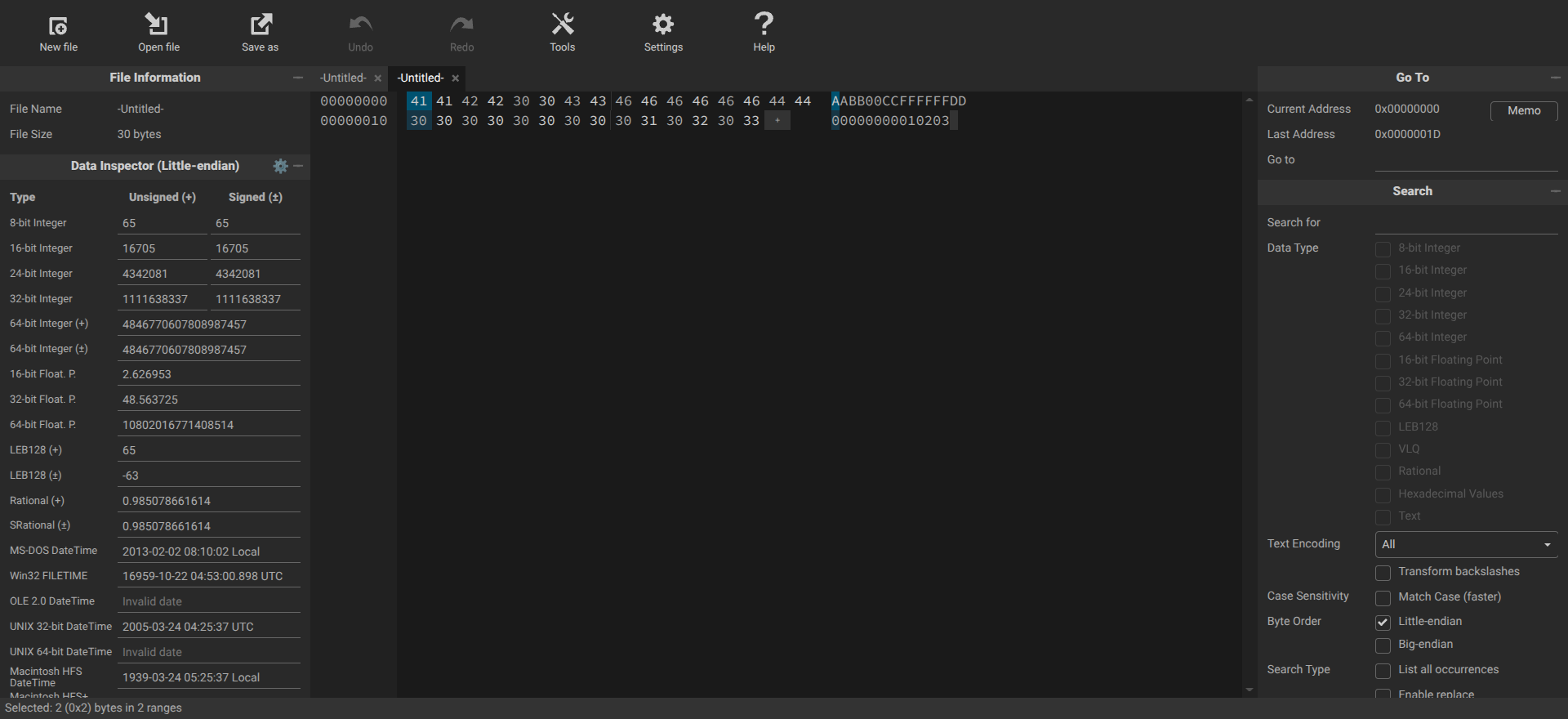
Challenge
Create a skeleton file using the bytes
5A5854617065211A01 and run it against DROID, FIDO, or
Siegfried, what PUID do you get?
fmt/1000 ZX Tape Format
There are no concrete rules for how to convert a PRONOM signature into a skeleton file.
A good rule of thumb is to always convert wildcards and unknown values ( *, ??, {n}, {n-m} ) to zero bytes as they will help make it easier to see how the file is spaced out.
For sequences described by PRONOM as optional or belonging to one out of a set of values ( (aa|bb), (aa|bb|cccc), (aaaa|ffff) ) you only need to select one byte or set of bytes..
It’s a good idea to create some space between sets of sequences, for example between BOF and EOF sequences. Pick a number between 1 and 20 bytes (or as many bytes as you like) and enter that many null bytes between sequences.
Observe the way the skeleton file (bytes) below is spaced where zeros are used to replace wildcards in the signature.
| Skeleton file | 41 75 74 6F 43 41 44 20 42 69 6E 61 72 79 20 44 58 46 0D 0A 1A 00 00 00 00 00 00 00 00 00 00 00 00 00 00 00 00 00 00 00 00 00 00 53 45 43 54 49 4F 4E 00 02 48 45 41 44 45 52 00 00 00 00 00 00 00 00 00 00 00 00 00 00 00 00 00 00 00 00 00 09 24 41 43 41 44 56 45 52 00 01 41 43 31 30 31 32 00 00 00 00 00 00 00 00 00 00 00 00 00 00 00 00 00 00 00 00 00 00 45 4E 44 53 45 43 00 00 45 4F 46 00 |
| BOF | 4175746F4341442042696E617279204458460D0A1A00*0053454354494F4E0002{0-1}48454144455200*09{0-1}24414341445645520001{0-1}41433130313200*00454E4453454300 |
| EOF | 00454F4600 |
| Format | fmt/82: Drawing Interchange File Format (Binary): R13 |
- You can always measure your success in creating a skeleton file against the signature itself. Once you’ve created a good skeleton file it will match the signature that you are investigating.
Making use of skeleton files
Skeleton files have different uses. They enable us to:
- Test signatures.
- Identify false positives and multiple-identifications.
- Test the different format identification implementations.
- Share our work with the PRONOM team in lieu of sample files (or in support of).
Your resource for skeleton files
Siegfried’s build process uses a set of skeleton files and stores them in a repository called builder. You can find those at the link below.
- A file you have created by reversing a PRONOM signature is called a skeleton file
- You can reverse engineer PRONOM signatures to investigate existing patterns and existing files
- By comparing sequences in skeleton files and seeing how they align with known files in the hex editor you can understand if a pattern should match if it is not always obvious, e.g. due to complexity
- Reversing PRONOM syntax has other uses, e.g. creating skeleton files.